Securing Windows Environments: Eliminating Static Credentials and VPN Overreach with Boundary and Vault
Introduction
Many organizations running Windows environments continue to struggle with outdated security practices that expose them to credential theft and lateral movement. Despite modern authentication methods like multi-factor authentication (MFA), the underlying problem of static, long-lived credentials remains widespread. Additionally, traditional VPNs grant overly broad network access, making it difficult to enforce least-privilege principles. This article explores how HashiCorp Boundary and Vault together provide a modern approach to access and credential management, replacing static secrets and VPN sprawl with identity-based, ephemeral sessions.
The Persistent Problem of Static Credentials
Even with advances in secrets management, many IT teams still rely on static credentials to access Windows servers and workstations. Common practices include:
- Shared local administrator accounts
- Long-lived domain accounts
- Service accounts with passwords that rarely change
- Manually provisioned privileged credentials for emergency access
These credentials often remain valid for months or even years because manual rotation is burdensome and lacks automation. This creates a significant risk: if an attacker obtains one static password, they can move laterally across the network undetected. While MFA improves initial authentication, it does not address the reuse of static secrets for subsequent sessions. In many Windows environments, shared administrative credentials are common for RDP access, troubleshooting, and break-glass scenarios, further increasing exposure.
This reality should alarm CISO, DevOps, and security teams. The solution lies in combining dynamic credential generation with identity-based access control.
The Broad Access Challenge with VPNs
Traditional security models rely on a fortified perimeter protected by a VPN. While VPNs encrypt traffic and provide network entry, they rarely enforce granular user-to-resource restrictions. Once inside, users have broad access to entire subnets, enabling lateral movement. Organizations attempt to limit this with firewalls, security groups, and network segmentation, but these controls are IP-based and brittle—especially in dynamic cloud environments where IP addresses change frequently.
Additional tools and policies are often required to close the gap, leading to operational sprawl and management complexity. VPNs solve connectivity, but they do not solve access control at the user-to-resource level. What is needed is a solution that handles both credential management and identity-based access authorization.
A Better Model: Access and Credential Management with Boundary and Vault
How Boundary Changes the Access Paradigm
IBM Boundary (originally HashiCorp Boundary) redefines remote access by combining authentication and authorization into a single platform. Instead of granting broad network access, it creates a direct connection between a user and a specific target resource based solely on the user’s identity. This eliminates the need for VPNs and reduces the attack surface for lateral movement.
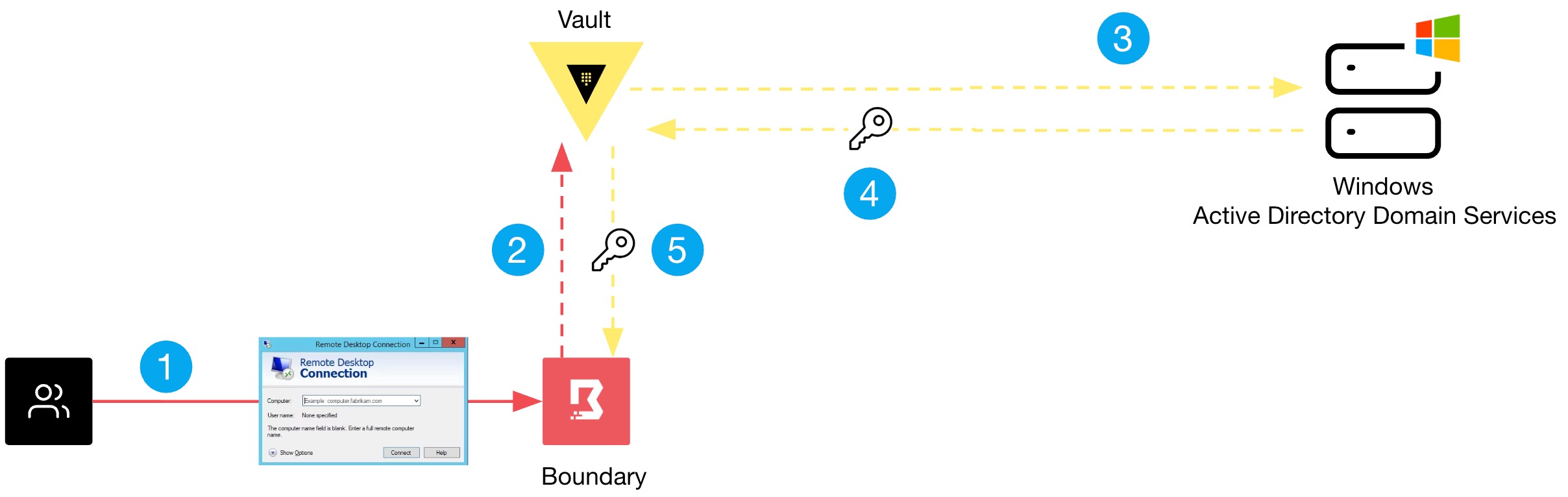
Boundary integrates with Vault to handle credentials on the user’s behalf. When a session is initiated, Vault dynamically generates short-lived credentials for the target Windows machine—such as a temporary local administrator password or a Just-In-Time domain account token. These credentials are automatically rotated after the session ends, ensuring that no static secrets persist.
The Role of Vault in Secrets Management
Vault serves as the centralized secrets store, providing dynamic secrets generation for Windows environments. It can integrate with Active Directory to manage domain account passwords or leverage its database backend for local accounts. Organizations can define policies that grant access to specific secrets only after Boundary authorizes the user. This tight integration ensures that credentials are never exposed to users directly; instead, Boundary proxies them seamlessly.
For example, a support engineer needing to RDP into a Windows server can authenticate to Boundary via their corporate identity provider (e.g., Okta or Azure AD). Once authorized, Boundary requests a Vault-generated credential, establishes an encrypted session, and automatically injects the credential—without the user ever seeing the password. After the session ends, the credential is revoked.
Configuration Overview: Testing the Solution
Implementing Boundary and Vault for Windows access involves several steps. Below is a high-level outline for a proof-of-concept:
- Deploy Vault with the Active Directory or Windows secrets engine enabled. Configure a role that can rotate passwords on target machines.
- Integrate Vault with Boundary by adding a credential store pointing to the Vault endpoint. Bind credential libraries to target resources.
- Set up Boundary controllers and workers to manage proxies. Ensure workers have network access to Windows targets via RDP (port 3389).
- Configure Boundary targets (e.g., Windows servers) with host sets and credential libraries. Attach the Vault-generated credential.
- Define authorization policies in Boundary that map users or groups to targets. Users authenticate via an external identity provider.
- Test an access session: A user logs into Boundary, selects the Windows target, and automatically receives an RDP session with temporary, rotated credentials.
For detailed configuration, refer to the official HashiCorp documentation. Many organizations run this stack successfully in production, replacing legacy VPN and static password practices.
Conclusion
Static credentials and overly broad VPN access are two of the most persistent security risks in Windows environments. Boundary and Vault offer a compelling alternative: identity-based, ephemeral access combined with dynamic credential generation. This model not only reduces the likelihood of credential theft and lateral movement but also simplifies compliance and audit trails. By adopting this modern approach, organizations can achieve a true zero-trust architecture for their Windows infrastructure.
Start by evaluating your current authentication and access patterns. Then plan a pilot with Boundary and Vault to see how they can transform your security posture.