5 Hidden Pitfalls of Fixed-Height Cards (And How to Avoid Them)
Fixed-height cards are a common pattern in UI design. They create clean grids, consistent visual rhythm, and a sense of order. But beneath that polished surface lies a fragility that can shatter when real-world content enters the picture. This article explores five hidden pitfalls of fixed-height cards—and what you can do to prevent layout disasters.
1. The Assumption of Perfect Content
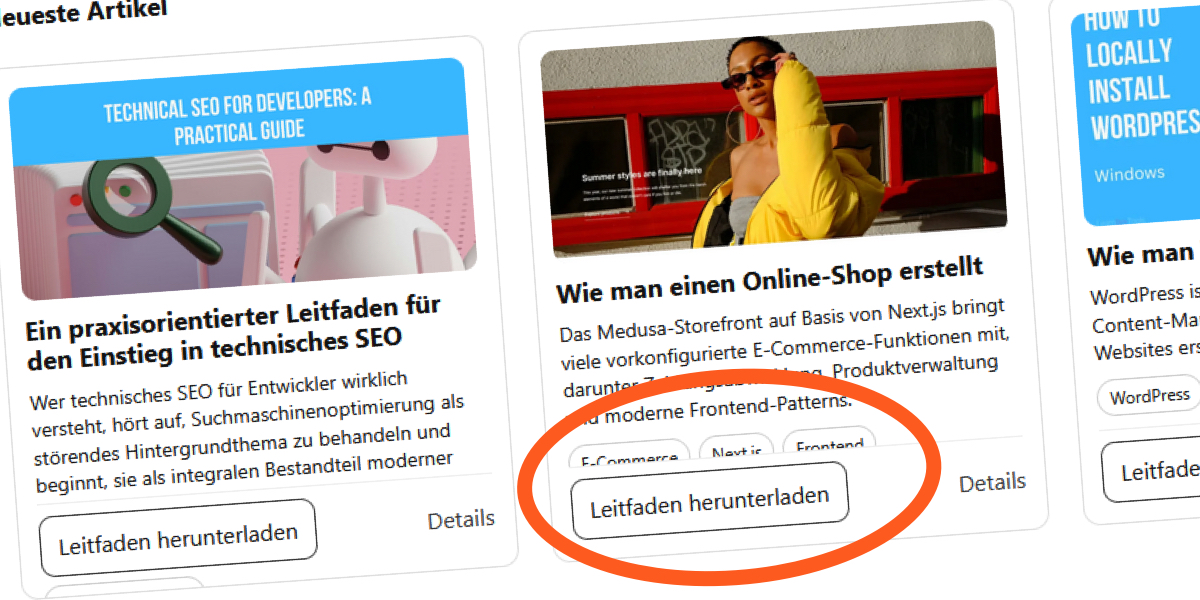
Designers often hand over mockups where every card aligns perfectly. Titles are short, excerpts fit neatly, and the layout looks stable. So you implement the design exactly as specified. It works—until the content changes. An editor updates copy, translations add longer words, and users bump their default font size. The fixed height becomes a jail cell for text. The original 'Recent Articles' blog assumed short English titles. It looked solid at first, but once the content shifted, cracks appeared. The assumption that content will always stay within a fixed height is a fragile one. As we'll see later, hiding the problem doesn't solve it.
2. The Translation Trap
When you translate content into languages like French or German, word lengths increase dramatically. A short English title like 'Our Latest News' becomes 'Nos dernières nouvelles' in French, taking up more space. In the original example, French translations pushed the layout further, and German did even more damage. The fixed-height container couldn't accommodate the extra characters, leading to overlapping or clipped text. This isn't a niche issue—many sites serve multilingual audiences. Relying on fixed heights assumes all languages have similar character counts, which is false. Font-size changes make the situation even worse.
3. The Font-Size Factor
Users with low vision or digital eye strain often increase their browser's default font size. This simple accessibility adjustment introduces pressure inside fixed-height cards. Your text blocks grow, but the container remains the same size. Elements begin competing for the same space. Normally, a block element grows with its content. But when you set a fixed height, you break that relationship. The browser doesn't treat this as a problem—it just resolves the conflict by letting content overflow or clipping it. Line-clamp can mask the issue, but it's a band-aid, not a fix.

4. The line-clamp Illusion
CSS -webkit-line-clamp is a popular way to truncate text after a set number of lines. But it only works when paired with overflow: hidden and display: -webkit-box. Many developers set both, thinking they've solved the problem. In the original example, the title had a 2-line clamp and the excerpt a 3-line clamp. Everything looked fine—until the font size changed or translations added longer words. Without overflow: hidden, the text overflows visibly. With it, the overflow is hidden, but content is still clipped. Users miss information. The illusion of control is dangerous. The safety net of overflow hidden can be removed to reveal the truth.
5. The overflow: hidden Cover-Up
Setting overflow: hidden on a fixed-height card hides the problem but doesn't fix it. Content gets clipped, making information inaccessible. In the original layout, the author bluntly hid issues with this property. To expose the failure, they removed the safety net—and the card broke open, with text overflowing and overlapping. The lesson is clear: don't cover up layout fragility. Instead, use flexible heights. Let content dictate size. Use min-height if you need a minimum, or auto for natural growth. For grid alignment, use consistent gaps and vertical rhythm rather than identical heights. This approach respects accessibility and real-world content changes.
Don't let fixed-height cards fool you into a false sense of stability. The hidden pitfalls—content assumptions, translations, font-size changes, line-clamp illusions, and overflow cover-ups—can all undermine your layout. Embrace flexible heights. Your users (and your future self) will thank you.