Mastering KV Cache Compression with TurboQuant: A Step-by-Step Guide
Overview
Large language models (LLMs) are transforming AI applications, but their inference can be bottlenecked by the key-value (KV) cache—a memory structure that grows linearly with sequence length. TurboQuant, recently released by Google, is a powerful algorithmic suite and library designed to apply advanced quantization and compression techniques to LLMs and vector search engines (a critical component of Retrieval-Augmented Generation systems). This tutorial focuses on using TurboQuant to compress the KV cache, reducing memory footprint while preserving model accuracy.
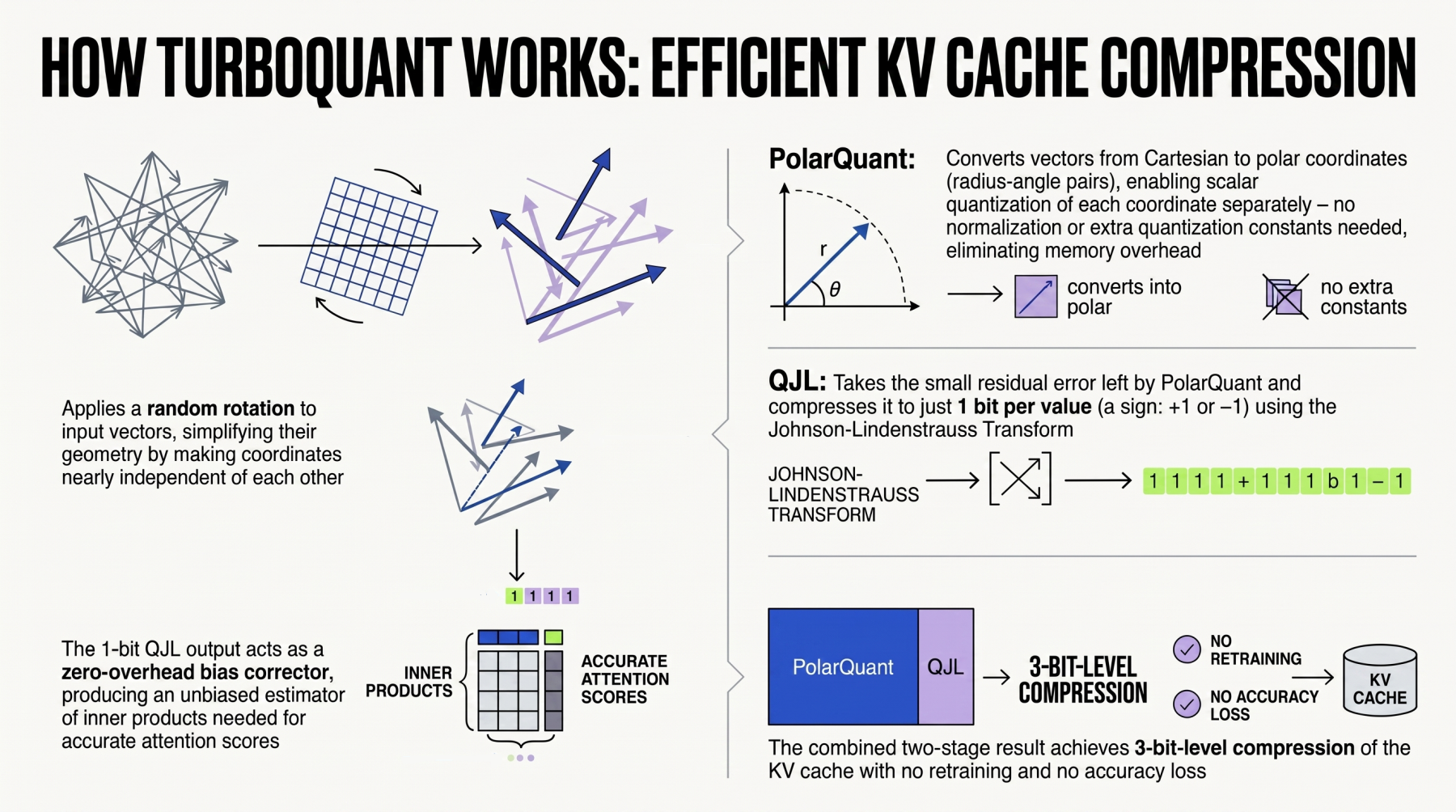
By the end of this guide, you’ll understand how to set up TurboQuant, quantize your LLM’s KV cache, and integrate compression into your inference pipeline—all with practical code examples and common pitfalls to avoid.
Prerequisites
Before diving in, ensure you have the following:
- Python 3.8+ and basic familiarity with PyTorch or JAX.
- A compatible LLM (e.g., LLaMA, GPT-style) stored in Hugging Face
transformersformat or a saved checkpoint. - TurboQuant library installed via
pip install turboquant(note: as of this writing, TurboQuant may be available as a pre-release; check Google's official repository). - Access to a GPU with at least 8 GB VRAM for model calibration and testing.
- Basic understanding of quantization concepts (e.g., bits, scales, zero-point).
Step-by-Step Instructions
1. Install and Import TurboQuant
Start by installing the library and importing necessary modules:
pip install turboquantThen in your Python script:
import torch
from turboquant import TurboQuantConfig, quantize_kv_cache
from transformers import AutoModelForCausalLM, AutoTokenizer
2. Load Your Base Model
Load the LLM you want to compress. For this example, we’ll use a small LLaMA-2-7B model:
model_name = "meta-llama/Llama-2-7b-chat-hf"
tokenizer = AutoTokenizer.from_pretrained(model_name)
model = AutoModelForCausalLM.from_pretrained(
    model_name,
    torch_dtype=torch.float16,
    device_map="auto"
)
3. Configure TurboQuant for KV cache
Create a configuration object. TurboQuant offers several quantisation schemes (e.g., INT4, INT8). For aggressive compression, use 4-bit:
config = TurboQuantConfig(
    quantization_bits=4,          # 4-bit for KV cache
    calibration_dataset="c4",    # or a custom dataset
    calibration_length=128,       # tokens per sample
    group_size=64,                # e.g., 64 elements per group
    symmetric=False               # use asymmetric quantization
)
Key parameters:
quantization_bits: Target bit width (4, 8, etc.).calibration_dataset: Dataset for calibrating scale/zero-point (e.g., C4, WikiText-2).group_size: Number of elements per quantization group; smaller groups give finer granularity but more overhead.symmetric: Whether to use symmetric quantization (often benefits weight quantization; for KV cache, asymmetric can be better).
4. Apply KV Cache Quantization
TurboQuant provides a high-level function to quantize the key and value projections of all attention layers:
quantized_model = quantize_kv_cache(model, config, device="cuda")This function does the following internally:
- Runs a calibration pass over
calibration_lengthtokens from the dataset to collect statistics (min/max) of K and V activations. - Computes optimal scale and zero-point per group.
- Patches the model’s forward method to apply quantization on the fly during inference.
5. Perform Inference with Compressed Cache
Now you can generate text as usual. The KV cache will be stored in quantized form, saving memory:
input_text = "The capital of France is"
inputs = tokenizer(input_text, return_tensors="pt").to("cuda")

with torch.no_grad():
    outputs = quantized_model.generate(
        **inputs,
        max_new_tokens=50,
        use_cache=True
    )

print(tokenizer.decode(outputs[0]))
Observe memory usage with nvidia-smi; you should see a significant reduction compared to the unquantized version.
6. (Optional) Tune for Accuracy
If model quality degrades, try adjusting group_size or quantization_bits. For example, use 8-bit with group_size=128 for a better trade-off:
config_8bit = TurboQuantConfig(quantization_bits=8, group_size=128)
quantized_model_8bit = quantize_kv_cache(model, config_8bit)
Evaluate perplexity on a hold-out set (e.g., WikiText-2) using eval_ppl = quantized_model.evaluate(...) if TurboQuant provides such a helper.
Common Mistakes
1. Skipping Calibration
Applying quantization without proper calibration can lead to severe accuracy loss. Always provide a representative calibration dataset (e.g., the training set or a generic one like C4).
2. Using Symmetric Quantization for KV Cache
Symmetric quantization assumes activations are centered around zero, but KV cache values can be skewed. Asymmetric quantization (default) usually yields better results.
3. Ignoring Group Size Overhead
While smaller groups improve accuracy, they also increase metadata overhead. Monitor actual memory savings; sometimes larger groups (128–256) strike the best balance.
4. Quantizing Only Keys or Only Values
TurboQuant by default compresses both K and V. If you quantize only one, the memory benefit is halved but accuracy may improve slightly. Test both scenarios for your use case.
5. Forgetting to Clear Cache Between Runs
When debugging, old KV cache entries can persist. Use torch.cuda.empty_cache() and re-run based on fresh model state.
Summary
TurboQuant offers an efficient, easy-to-integrate solution for compressing the KV cache in LLMs. By following the steps above—loading a model, configuring quantization, calibrating, and applying the compression—you can significantly reduce memory usage during inference, often with minimal impact on output quality. Start with 4-bit quantization and a representative dataset, then tune group sizes and bits as needed. Avoid common pitfalls like skipping calibration or using symmetric quantization naively. With TurboQuant, deploying long-context LLMs becomes far more practical.